Introducing Micepad Agents — AI that runs your event ops. Meet the agents

Launching The New V.8 Admin Panel
Micepad Team 3 min read
1,000+
Events powered
500K+
Attendees Engaged
2.8s
Avg check-in time
APAC
Regional coverage
Launching The New V.8 Admin Panel

v.8 is here!

Last December, we announced that we had updated the admin panel navigation in the first step to improving user experience and make features more accessible. 3 months later, we not only have a new website, but a new dashboard!

New features

1. Main Dashboard
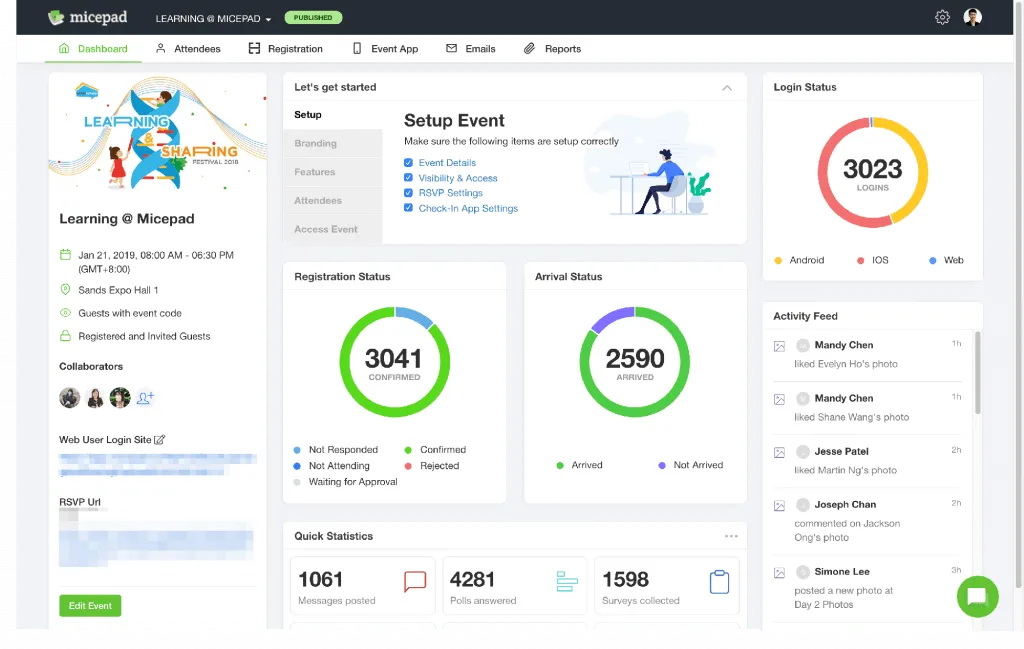
Firstly, there’s the main dashboard. Previously, the old dashboard didn’t have charts, instead displaying only the numbers. After compiling the feedback from clients, we decided to display the data in a more versatile and comprehensive manner.

In the first update of v.8, certain data sets will be easier to grasp at a glance through the use of donut charts. A real time feed has also been added on the right to show posts, discussions and photos shared by all users. Additionally, quick statistics will reflect increases or decreases in real time.

2. Clone Event

Previous users probably remember the hassle of importing and exporting the content files for events with repeated agendas. Additionally, one of the biggest issues we faced was the possibility of incompatible files after a recent update.

So here’s the good news – you can now clone your event in one click! Just click on the new “Clone Event” button as shown in the image above and you’ll be able to duplicate your even with the exact same content. All event agendas, information pages, uploaded PDF documents and speaker profiles will be copied over.

3. Customised form fields

In v.7, registration form fields were all preset, Admin users can now customise the form fields for registration forms as well as app-login forms. Pick and choose from a variety of field types and even select your header text size!

Form fields can also be made compulsory or read only. The latter was specially requested in order to display preset details like table numbers and/or room names. We’ve found this particularly useful for events requiring further separation of guests for breakout sessions and other workshop activities.

4. Guest profile separation

When a single guest is attending multiple events with different agendas, sometimes they prefer to change their profiles. Previously, the account profile was the profile displayed at all events. However, with this new update guests can now have separate profiles for separate events – they can change their description, title or other viewable content to suit the occasion!

In addition, authorisation has been given to admin users to edit guest information on their behalf, i.e. when there are erroneous or outdated contact information. This is also a much requested add-on by clients due to guests utilising a shared account or standing in for an invitee.

company-news registration feedback speakers agenda

Micepad Case Studies Across Region

Real events. Real numbers. Same region as you.

Hong Kong Tourism Board

Micepad x HKTB: Powering Registration & Check-In for 2,000 Attendees at Hong Kong Tourism Overview 2026

2,000 Attendees Badge Printing Government & Tourism

Micepad delivered seamless on-site registration, badge printing, and QR code check-in for the Hong Kong Tourism Board's record-breaking Hong Kong Tourism Overview 2026 event.

View case study
MongoDB
MongoDB

Micepad × MongoDB: Check-In, Badge Printing & Lead Capture for 15,000+ Attendees Across 10 APAC Cities

15,000+ Attendees APAC-wide Technology

MongoDB standardized check-in and onsite operations across multiple APAC cities with Micepad, delivering consistent, professional experiences for thousands of attendees at their flagship MongoDB.local events.

View case study
Seedly
Seedly

Micepad × Seedly: 5,600 Concurrent Attendees on a Virtual Event Platform

5,000+ Attendees Community Events Fintech

Micepad's platform has been instrumental in helping Seedly scale their community events effectively, enabling seamless registration and attendee engagement.

View case study

What you actually get with Micepad

Three products. Built for event day. Used together or standalone.

CHECKED IN
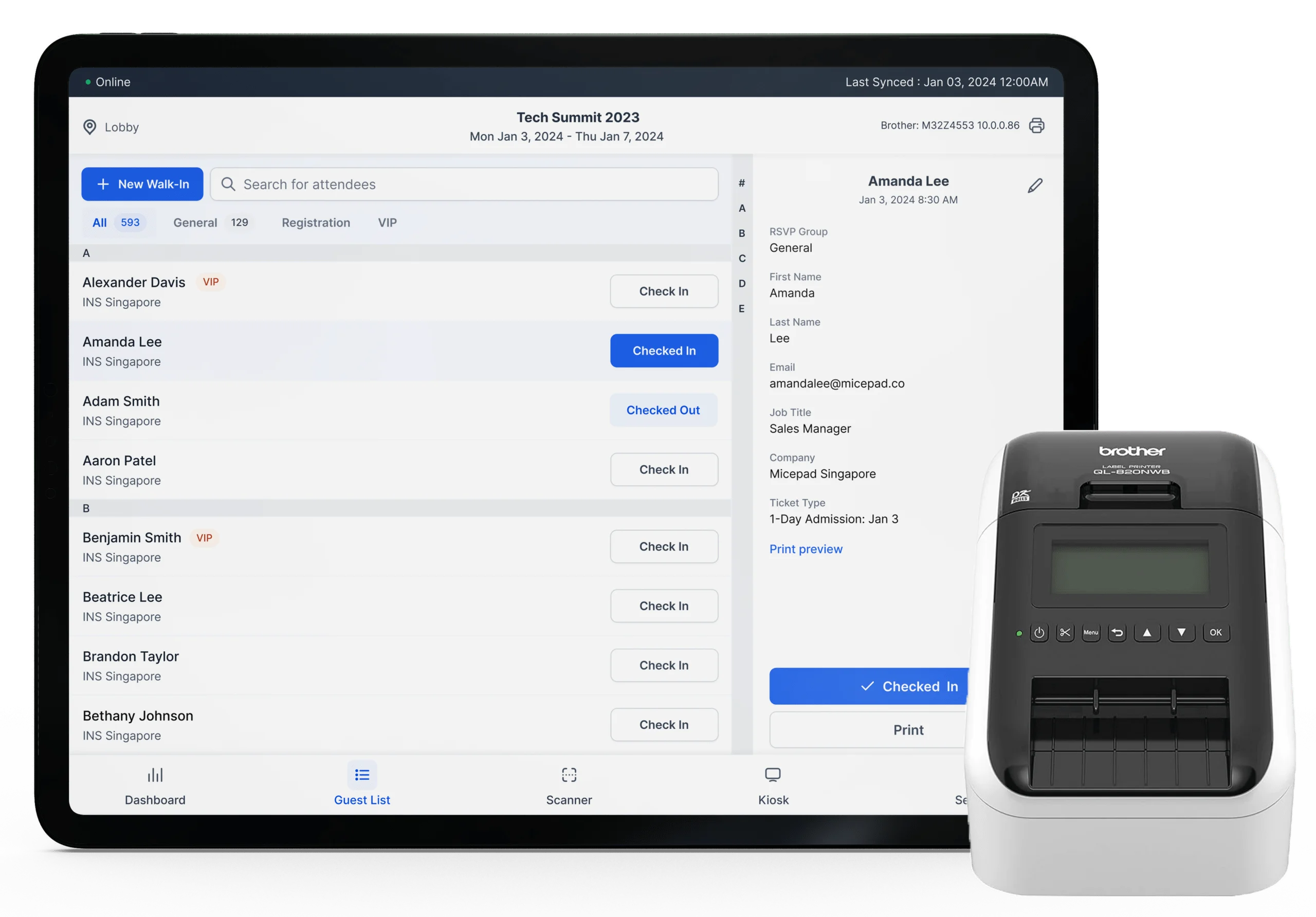
Product · Check-in app

Sub-3-second QR check-in

Offline-first kiosks that hold up at the 9am rush. Works on any iPad — no special hardware.

See it in action
MICEPAD
Tom
Head of Customer
Micepad
Product · Badge printing

On-demand badge printing

Print on arrival from any kiosk. No pre-printing waste. Designer-grade templates included.

See badge designs
Product · Lead capture

Sponsor lead capture

Sponsors scan, qualify, and sync leads to your CRM in real time. No SD card pickup.

See sponsor view
Book a 15-min demo

See Micepad run a check-in queue, live

We'll mock your event in real time. No slide deck. Just the app, your numbers, your venue.

  • Live check-in simulation
  • Pricing for your event size
  • Migration plan from your current tool
  • APAC-hours support roadmap
No hard sell. If Micepad isn't the right fit we'll tell you on the call.

Tell us about your event

By submitting you agree to our privacy policy. We respond in < 4 business hours, APAC time.

Event Management Software Pricing Plans

Choose the plan that fits your event needs. All plans include our core platform features.

Free

USD $0

Free forever

Up to 50 attendees
Sign Up
  • QR Code Check-in
  • Seating Chart
  • Basic Reports

Starter

USD $300 /event

Your first event is on us

Sign Up
  • Everything in Free
  • Badge Printing
  • Data Export
  • Attendee Management
Most Popular

Pro

USD $500 /event

Your first event is on us

Sign Up
  • Everything in Starter
  • Registration Forms
  • Email Campaigns
  • Kiosk Mode
  • Custom Badge Designer

Enterprise

Custom

Starts from 3,000 attendees

Starts from 3,000 attendees
Contact Sales
  • Everything in Pro
  • API Access
  • Dedicated Support
Demo
Start free up to 50 pax
No credit card · 20-min setup
Start free →

You May Also Like