11 Best Lead Retrieval Apps for Trade Shows in 2026
Updated November 19, 2026 · By the Micepad Team · Prices checked against vendor pages and published 2026 show order forms
A lead retrieval app is software that allows trade show exhibitors and sponsors to scan attendee badges, capture contact information, and qualify leads instantly using standard mobile devices. This guide compares 11 lead retrieval apps for US exhibitors, sponsors and event organizers, with the prices vendors and 2026 show order forms actually publish, and an honest "watch out for" on every tool, including ours.
TL;DR: Quick Answers for Busy Organizers and Exhibitors
- Best for organizers running check-in and printing badges: Micepad
- Best universal trade show lead retrieval app for multi-show exhibitors: Cvent | iCapture
- Best low-cost starting point for small teams: Blinq (free plan; team lead capture from $4.99 per card/month billed annually)
- What official trade show lead retrieval costs in 2026: Typically $255 to $685 for the first app license, or $395 to $735 for hardware rentals.
- Before you buy anything: check the exhibitor manual. Many shows sell an official lead retrieval app, and some shows only let that app read full badge data.
How We Chose These Lead Retrieval Apps
We shortlisted the lead retrieval software that ranks for US trade show searches and appears on 2026 exhibitor order forms, then checked each one against its own product and pricing pages in November 2026. Where a vendor does not publish a price or a feature (such as offline mode), we say so instead of guessing. Micepad is our product; we include it with the same "watch out for" treatment as everyone else.
What Is Lead Retrieval (and How Does a Lead Retrieval App Work)?
Lead retrieval is the process of capturing, qualifying and exporting attendee contact details at a trade show or conference. A modern lead retrieval app turns a smartphone or tablet into a digital scanner.
When an exhibitor scans an attendee's badge QR code, barcode, or NFC chip, the software instantly decodes the contact record. Staff can then add custom qualifier questions, tag leads as hot, warm, or cold, and type free-form notes. Finally, the data is exported to a spreadsheet or synchronized directly with a CRM.
To understand how event lead retrieval fits into your strategy, examine the three primary buying models in the industry:
Scroll horizontally to compare all columns.
| Model | Who pays | Works at | Typical 2026 cost | Watch out for |
|---|---|---|---|---|
| 1. Official Show Lead Retrieval | Exhibitor / Sponsor | Only the specific show | $255 – $685 first license, plus $140 – $200 per extra device | Tied to one event; expensive if exhibiting often |
| 2. Organizer Built-In Platform | Organizer (or sold to exhibitors) | Events using that platform | Bundled or sold as a sponsorship add-on | Restricted to the organizer's chosen software ecosystem |
| 3. Exhibitor-Owned Universal App | Exhibitor | Most shows, if the app supports that badge provider | Subscription-based (monthly or annual) | Relies on compatibility with various show badge formats |
How to Choose a Lead Retrieval App: 6 Things That Matter
Most lead retrieval apps scan a QR code. The differences that matter show up on the show floor and after it. Check these six things:
- Badge Compatibility: Does the app read 1D barcodes, 2D QR codes, or RFID badges? Universal apps must support diverse badge formats across different shows.
- Offline Mode: Venue Wi-Fi frequently fails on crowded exhibition floors. Ensure your software caches scans locally and syncs automatically when connection returns. Few vendors document this; ask for it in writing.
- Custom Qualifiers: Can your booth staff add tailored survey questions, lead ratings, and meeting notes immediately after a scan?
- CRM Sync vs. CSV Export: Check whether the tool offers native integrations with platforms like Salesforce and HubSpot, or if it relies on manual CSV exports.
- Device Flexibility: Can staff use their own smartphones and tablets, or does the vendor mandate expensive rented hardware?
- Pricing Model: Understand whether costs scale per license, per user, per device, or per event.
Comparison Table: The 11 Best Lead Retrieval Apps at a Glance
Scroll horizontally to compare all columns.
| App | Best for | Who buys it | Works with any show's badges? | Offline (documented) | CRM sync / export | Starting price |
|---|---|---|---|---|---|---|
| Micepad | Organizers managing on-site badges | Event Organizers | Only with Micepad-printed badges | Not documented | CSV export | Add-on to badge-printing plans (Starter from USD $300/event); quote-based |
| Cvent LeadCapture | Exhibitors at Cvent events | Exhibitors / Organizers | Only at shows using Cvent | Not documented | Salesforce / CSV export | Reported 2026 show order forms: $249 single license |
| Whova | Organizers seeking bundled tech | Event Organizers | Only at events running on Whova | Not documented | Spreadsheet export / CRM mentioned | Not published |
| Webex Events | Enterprise event organizers | Event Organizers | Only at Webex Events shows | Not documented | CRM mentioned / export | Not published |
| Swapcard | Networking-heavy trade shows | Event Organizers | Only at Swapcard events | Not documented | Export available | Quote-based |
| ExpoPlatform Lead Capture Pro | Large expos on ExpoPlatform | Event Organizers | Only at ExpoPlatform events | Yes (cached and auto-synced) | Export available | Quote-based |
| Eventleaf | Small-to-medium event organizers | Event Organizers | Only at Eventleaf events | Not documented | Export available | Tied to Ultimate plan (Call for price) |
| Cvent | iCapture | Exhibitors visiting multi-shows | Exhibitors | Yes (supports 150+ badge providers) | Not documented | Salesforce, HubSpot, Marketo | Quote-based |
| Popl | Tech-forward exhibitor teams | Exhibitors | Yes (Universal badge scanner) | Not documented | Salesforce, HubSpot, Marketo, Dynamics, Zoho, Monday.com, Slack | Quote-based |
| Blinq | Small businesses and low-cost teams | Exhibitors | Yes (Universal Scanner) | Not documented | HubSpot, Salesforce, Microsoft Dynamics 365 | Free tier available; Business plan from $4.99 per card/mo annual or $6.99 monthly (5-card minimum) |
| Captello | Revenue-focused enterprise booths | Exhibitors | "Universal Lead Capture" advertised; badge list not published | Not documented | CRM routing supported (CRMs not named) | Not published |
Note: "Not documented" means the vendor's own page does not say, not that the feature is missing.
Best Lead Retrieval Apps for Organizers (Built-In)
If you run the event, the simplest option is trade show lead capture built into the platform that already handles your registration and badges. The upside: exhibitors scan the same badges you print, with no extra hardware, and you can package the lead retrieval app as a sponsor benefit.
Micepad
Best for organizers who run check-in and on-site badge printing and want to give exhibitors and sponsors lead retrieval on the same badges.
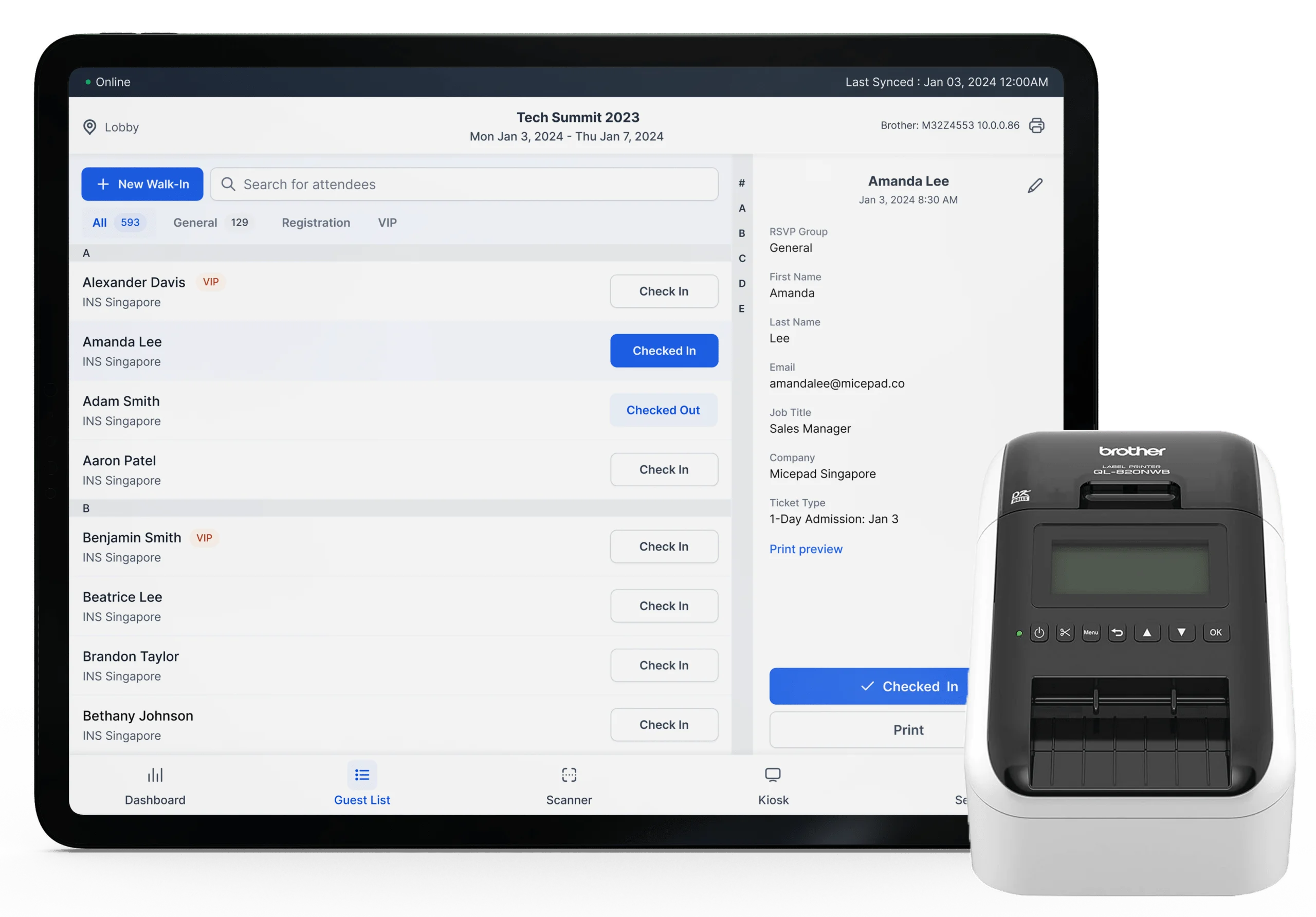
Micepad's lead capture app allows exhibitors and sponsors to scan attendee badge QR codes using any phone or tablet camera without specialized hardware. Every badge printed through on-site badge printing carries an encoded QR code, so exhibitor lead retrieval works with no extra setup. Paired with an event check-in app or a self-service check-in kiosk, organizers can import their attendee list from another registration tool (for example, export from Cvent and import into Micepad) and run the whole floor from one system. See how it fits trade show and expo management.
Key features:
- Free-text notes, qualification tags (hot, warm, cold), and lead ratings.
- Real-time lead dashboards showing leads per booth and live totals.
- Per-sponsor lead tracking and post-event ROI reports.
- Attendee-to-attendee mutual badge scanning for networking.
- CSV export with contact details, notes, tags and scan timestamp, ready for Salesforce, HubSpot or any CRM.
Watch out for: It is an organizer-side tool built around Micepad-printed badges. It is NOT a universal exhibitor app that reads any show's badges, and it functions as an add-on to plans featuring badge printing. CRM transfer is by CSV export, not automatic sync.
Pricing: Add-on to plans with badge printing (Starter from USD $300/event); lead retrieval priced by quote. See Micepad pricing.
Cvent LeadCapture
Best for exhibitors operating within the Cvent ecosystem.
Cvent LeadCapture integrates tightly with events managed on Cvent, enabling booth staff to scan attendee badges or business cards using mobile devices. It serves as a reliable trade show lead capture app for events powered by Cvent's infrastructure. Comparing platforms for your own event? See Micepad vs Cvent.
Key features:
- Custom qualification questions.
- Salesforce named as a supported CRM.
- On-demand lead export capabilities.
Watch out for: It is only available at shows running on Cvent, requiring exhibitors to purchase licenses per show.
Pricing: Not published by Cvent. Reported 2026 show order forms list a single license at $249, a 3-pack at $499, and additional licenses at $149.
Whova
Best for community-centric conferences needing simple booth scanning.
Whova enables exhibitors to scan attendee QR codes directly within the Whova mobile app, with manual entry fallback options available. Whova's pitch to organizers is that exhibitors no longer need rented scanning equipment, which helps attract more exhibitors. For a side-by-side on check-in and badges, see Micepad vs Whova.
Key features:
- Built-in mobile app scanner.
- Spreadsheet lead export at any time.
- Basic CRM integration options (no CRM brands named).
Watch out for: Tied strictly to events hosted on the Whova platform. Offline use and business card scanning are not documented.
Pricing: Not published.
Webex Events (formerly Socio)
Best for corporate events using the Webex ecosystem.
Webex Events allows exhibitors and sponsors to scan attendee badge QR codes, qualify leads, and assign ratings directly within the application. Organizers can easily issue licenses to exhibitors, resell them at a profit, or bundle them into sponsorship tiers.
Key features:
- QR code badge scanning and rating tools.
- Flexible license distribution for sponsors.
- General CRM export options.
Watch out for: Limited utility outside of events hosted on Webex Events. Offline mode is not documented.
Pricing: Not published.
Swapcard
Best for networking-heavy exhibitions.
Swapcard provides exhibitor team members with a mobile app featuring a Quick Scan mode for busy exhibition floors, alongside standard badge and business card scanning.
Key features:
- Quick Scan mode for rapid badge reading.
- Business card scanning functionality.
- Organizer monetization and tiered pricing controls (sell lead capture as an add-on, tier it, or sell exhibitor insights).
Watch out for: Pricing requires contacting sales. Works only at Swapcard-powered events; offline mode is not documented.
Pricing: Quote-based.
ExpoPlatform Lead Capture Pro
Best for large trade shows where venue Wi-Fi is unreliable.
ExpoPlatform Lead Capture Pro offers badge and QR code scanning for exhibitors at expos run on ExpoPlatform, and it is the only tool in this list that clearly documents offline scanning.
Key features:
- Documented offline mode that caches data locally during venue Wi-Fi outages.
- Automatic synchronization upon reconnection.
Watch out for: Tailored primarily for exhibitions using the ExpoPlatform ecosystem. CRM integrations are not named on the product page.
Pricing: Not published (book a demo required).
Eventleaf
Best for organizers wanting bundled registration and basic scanning.
Eventleaf provides registration, check-in, and badge printing alongside built-in event lead retrieval capabilities housed within its top-tier plan.
Key features:
- Unified registration and badge creation.
- Built-in lead scanning tools.
- Check-in and badge printing in the same platform.
Watch out for: Lead retrieval features are restricted exclusively to the highest-priced plan.
Pricing: Tied to the Ultimate plan ("Call for price").
How to Offer Lead Retrieval to Your Exhibitors (Organizer Guide)
If you run the event, a built-in lead retrieval app is more than a convenience. Vendors in this list describe three ways organizers package it:
- Include it in every booth package. Exhibitors see more value from the same booth fee and are more likely to rebook.
- Sell it as an add-on. Webex Events lets organizers resell licenses at a profit; Swapcard lets organizers sell lead capture as an add-on or in tiers.
- Bundle it into sponsorship tiers. Per-sponsor lead reports give sponsors proof of ROI, which makes renewals easier.
How it works in Micepad, step by step:
- Import attendees from your registration tool by CSV (or register them in Micepad).
- Print badges on-site; each badge carries a QR code with the attendee's details. Use the badge size guide to pick a format.
- Exhibitors and sponsors open the Micepad app on their own phone or tablet and scan badges, then add notes, tags and ratings.
- Watch the live lead dashboard during the show, then send each sponsor its lead report and CSV export.
Best Trade Show Lead Retrieval Apps for Exhibitors (Universal Lead Capture)
Exhibitors who attend several shows a year on different registration platforms need standalone lead retrieval software that works across shows. This is where trade show lead retrieval gets tricky: always confirm your show's badge provider is supported before you rely on a universal lead retrieval app.
Cvent | iCapture
Best for multi-show exhibitors needing universal badge compatibility.
iCapture used to be independent; it is now owned by Cvent and branded as Cvent | iCapture. Unlike Cvent LeadCapture, it is bought by the exhibitor and travels with you from show to show.
Key features:
- Supports 150+ badge providers out of the box.
- Flexible data capture with or without badges (badge scan, photo capture, manual entry, attendee list upload).
- Native integrations with Salesforce, HubSpot, and Marketo.
Watch out for: Requires a subscription independent of individual show organizers. No public price, and offline mode is not documented.
Pricing: Not published (quote-based).
Popl
Best for sales teams using digital business cards and modern badges.
Popl offers an event lead capture platform featuring an AI-native universal badge scanner and paper business card scanning capabilities.
Key features:
- AI-native universal badge scanner.
- Comprehensive CRM and calendar integrations (Salesforce, HubSpot, Marketo, Microsoft Dynamics, Zoho, Monday.com, Slack).
- Digital business card infrastructure.
Watch out for: Pricing requires a direct sales consultation.
Pricing: Not published. Popl quotes pricing in a meeting.
Blinq
Best for small teams seeking an affordable entry point.
Blinq is a digital business card provider that includes a universal scanner capable of reading badges, business cards, QR codes, and LinkedIn profiles.
Key features:
- Universal scanner for badges and cards.
- SOC 2 Type II audited and GDPR compliant.
- Native CRM sync (HubSpot, Salesforce, Microsoft Dynamics 365).
- Business plan adds event lead capture with badge scanning, Lead Capture Mode and Badge Kit APIs.
Watch out for: Advanced event lead capture features require the Business plan, which carries a 5-card minimum.
Pricing: Published: Free $0; Premium $9.99/mo monthly or $7.33/mo annual; Pro $22.49/mo monthly or $16.58/mo annual; Business $6.99 per card/mo monthly or $4.99 per card/mo annual (5-card minimum); Enterprise custom.
Captello
Best for revenue-focused enterprises linking event actions to pipeline.
Captello positions itself as an event-to-revenue intelligence platform designed to capture, enrich, and route every lead directly into a CRM.
Key features:
- Lead enrichment and routing to your CRM as attributed pipeline.
- "Universal Lead Capture" advertised (supported badge providers not listed).
- 60+ booth activations and games to drive qualified engagement.
Watch out for: Captello publishes no pricing, no CRM names and no badge-provider list; ask for a demo on your show's badges.
Pricing: Not published.
Running a trade show or sponsored conference? Book a Micepad demo to see check-in, badge printing and exhibitor lead capture on one badge.
Questions to Ask Before You Buy a Lead Retrieval App
- Can it read this show's badges? Ask for the badge provider name and test a sample badge.
- Does it work offline, and how does it sync when Wi-Fi returns?
- Can I add my own qualifier questions, tags and notes?
- Does it sync to my CRM automatically, or do I export a CSV?
- Do staff use their own phones, or do I need to rent devices?
- Am I paying per license, per device, per user, per event or per year?
- Who owns the lead data, and how long can I access it after the show?
Official Trade Show Lead Retrieval: What It Costs in 2026
When organizers mandate their official vendor, exhibitors must purchase licenses through the exhibitor service manual. Reviewing published 2026 show order forms reveals typical cost structures: trade show lead retrieval is usually priced per device, with a cheaper rate for each extra license and a higher price after the early-bird deadline.
Scroll horizontally to compare all columns.
| Event / Source | Mobile App License (Early / Late) | Additional License | Rented Handheld Hardware | Notes |
|---|---|---|---|---|
| ATD 2026 International Conference & EXPO | $350 – $400 | $150 – $200 | $495 – $545 | One license per device |
| Central Plains Dairy Expo 2026 | $249 (single) / $499 (3-pack) | $149 | $499 – $599 | Cvent LeadCapture vendor |
| A4M World Congress 2026 | $400 (3-pack) | $100 | $400 (one handheld) | Bundled app tier available |
| EWMA 2026 (Europe) | €240 – €290 | €120 – €150 | Not listed | Regional early/late tiers |
| Range across nine 2026 order forms (Vendelux) | $255 – $685 | $140 – $200 | $395 – $735 | Plus delivery $115 – $230 and damage fees |
Exhibitors should budget for early-bird deadlines to avoid late-fee premiums, and note that hardware rentals often incur mandatory delivery and damage fees. These are examples from published 2026 order forms, not universal prices.
Lead Retrieval App vs. Rented Badge Scanner Device
Scroll horizontally to compare all columns.
| Feature | Mobile Lead Retrieval App | Rented Handheld Scanner Device |
|---|---|---|
| Hardware | Runs on staff smartphones or tablets | Dedicated scanner hardware provided by show vendor |
| Cost | Typically lower ($255 – $685 first license, $140 – $200 per extra device on 2026 forms) | Higher per unit ($395 – $735 plus delivery fees) |
| Data Access | Real-time cloud sync and instant export | Leads come through the show vendor; check on the order form how and when you receive them |
| Staff Usability | High familiarity (staff use their own phones) | Requires brief training on dedicated hardware |
| Risk | Device loss means phone replacement | Hardware loss incurs heavy damage or replacement fees |
How to Get More from Trade Show Lead Capture
The app is only half of trade show lead capture. These habits decide how many leads turn into pipeline:
- Pre-Configure Qualifier Questions: Set up standard qualifying criteria (budget, timeline, product interest) before arriving on-site so staff can log answers with a single tap.
- Scan in the First Two Seconds: Engage visitors immediately and scan their badge early in the conversation so no contact is lost if the visitor walks off.
- Use Hot/Warm/Cold Tags: Categorize leads instantly to ensure your sales team prioritizes high-intent prospects during post-show follow-up.
- Export and Upload Same-Day: Avoid letting business cards and app data sit dormant; sync or export leads daily to maintain momentum.
- Enforce 24–48 Hour Follow-Up: Leads go cold fast after a show. Assign automated email sequences or sales outreach within two days of show close.
- Train Booth Staff: Run a quick 15-minute walkthrough of your badge scanning app before the exhibition doors open.
- Check-in sets up lead capture: if you are the organizer, fast badge printing at the door means every attendee has a scannable badge. See our guide to the best event check-in apps and event registration software.
Frequently Asked Questions
What is the best app for finding leads?
There is no single universal winner, as the right choice depends on your event setup. Exhibitors visiting multiple shows often prefer Cvent | iCapture or Popl for universal badge scanning, while organizers who run their own check-in and badge printing are a better fit for Micepad. Exhibiting at just one show? Check whether the show already sells an official lead scanning app before you buy anything else.
How much does iCapture cost?
Cvent | iCapture does not publish public pricing on its website. Pricing is quote-based, so ask Cvent for a quote based on your team size and number of shows.
What are the best lead capture apps?
The top trade show lead capture apps include Cvent | iCapture for independent exhibitors, Blinq for budget-conscious small teams, ExpoPlatform Lead Capture Pro for large expos with unreliable Wi-Fi, and Micepad for organizers managing integrated registration and badge printing.
What is the best free tool for lead generation?
Blinq offers a functional free tier ($0) that includes two digital cards, a universal contact scanner, and unlimited contact storage, making it an accessible starting point for solo professionals and small teams before upgrading to team tiers.
What is lead retrieval at a trade show?
Lead retrieval at a trade show (also called event lead retrieval) is the systematic collection of attendee contact information using digital tools like badge scanners. It replaces manual business card collection by instantly capturing verified registration data into a structured database.
Lead retrieval app vs. rented badge scanner device: which is better?
For most exhibitors a lead retrieval app is the better choice: it costs less than a rented device, runs on phones staff already know, and syncs in real time. Rented handheld devices are only necessary if show rules prohibit personal devices or if staff lack compatible mobile phones.
Do I need the show's official lead retrieval or can I bring my own app?
It depends on the show organizer's rules. Check the exhibitor manual first: some shows only let the official lead retrieval app read full badge data. Universal lead retrieval software such as Cvent | iCapture (150+ badge providers) or Popl can work when they support that show's badge provider, so test a sample badge before the show.
How do I get trade show leads into my CRM?
Choose a tool with native CRM sync (for example Cvent | iCapture, Popl or Blinq connect to Salesforce and HubSpot). If native syncing is unavailable, you can export your captured leads as a CSV file and import them directly into your database.
Final Verdict
If you are an organizer looking to integrate registration, badge printing, and sponsor lead tracking into a single workflow, pick Micepad.
If you are a multi-show exhibitor needing to scan badges across dozens of different organizer ecosystems, pick Cvent | iCapture.
If you are a lean sales team looking for an affordable digital card and scanning combo, pick Blinq. Ready to give your exhibitors a lead retrieval app on the badges you already print? Book a demo with Micepad today.
Turn tradeshow leads into pipeline
Badge-scan + CRM export end-to-end. See how Micepad handles exhibitor lead capture.