Complete Guide to Improve Your Online Event Registration Process
The event registration process sits right in the middle of capitalizing on your marketing efforts and converting interested attendees into actual registrants. As crucial as this step is, it’s essential to get it right by meticulously preparing everything from your landing page design and pricing strategy to the registration fields and payment options. If this is your first time diving into this process, let’s explore how you can excel and set yourself up for success.
Online Event Registration Process Is Tricky But Worthwhile
Switching to an online event registration process can seem a bit overwhelming at first. Compared to traditional methods, the setup can be more complex. But trust us, it’s totally worth it. When you move your registration process online, you’re setting yourself up for success by automating a ton of tasks that would otherwise take up precious time.
Time and simplicity are resources you can’t afford to waste, especially when dealing with customer relationships. In the event registration phase, every interaction should show your clients that you value their time highly. If they feel their time is wasted, they have plenty of other options to consider.
An online registration system can help you handle the registration by streamlining everything from sign-ups to payment processing, making the whole process smoother for both you and your attendees. No more sifting through paper forms or managing endless spreadsheets. Instead, you get to focus on delivering an excellent event experience, while the system takes care of the quintessence details.
By automating tasks like promoting the basic details of events, writing down and tracking attendee information, managing payments, and sending confirmation emails, you free up your time to focus on what really matters – creating a memorable event. Plus, your attendees will appreciate the ease and efficiency of registering online, which can significantly improve their overall experience with your event.
Basic Template of Online Event Registration Form
While every event is unique, having a basic template of event registration can help ensure you collect all the necessary information. Feel free to customise this template based on the specific requirements of your event. Here’s a comprehensive list of fields to consider for your registration form:
Assess Your Event Registration Landing Page Correctly Before Launching
Getting your event registration landing page right before launching is not a skippable option! It’s important to test the process yourself and see it through the eyes of your attendees. Here’s a guide to help you assess your landing page effectively.
1. Test Your Registration Process
Start by signing up for your own event. Fill out the registration form and note how long it takes and if there are any issues that might frustrate potential attendees. Treat this as a dry run to iron out any kinks before the actual event.
Questions to Consider:
- Is the registration form clear and concise?
- Are you asking for information already in your system?
- Are there any unnecessary steps?
- Are the pages loading quickly?
2. Check Your Conversion Metrics
Understanding your conversion metrics is key to identifying potential problems. Look at how many people visit your event website, how many click the registration link, and how many actually register. If there’s a big drop-off, it means something is causing people to abandon the process. The key metrics to analyse are website traffic, click-through rates on registration links, and conversion rates (both in visitors and event’s registrants). These key metrics will also help you formulate the event ROI.
3. Common Issues and How to Resolve Them
Below are some of most common issues that will hinder your online registration process:
First and foremost: Ineffective Event Marketing Strategy
An ineffective event marketing strategy can prevent people from even reaching your registration page. Low traffic to your registration page often signals issues with your event promotion efforts. To avoid this, make sure your social media promotions are well-timed and consistent across all channels like LinkedIn, Instagram, and Facebook.
Target your email marketing campaigns to the right demographic with engaging messaging, and encourage brand advocates, integration partners, and influencers to share the event with their audiences. Additionally, follow up with those who abandoned their registrations to re-engage them.
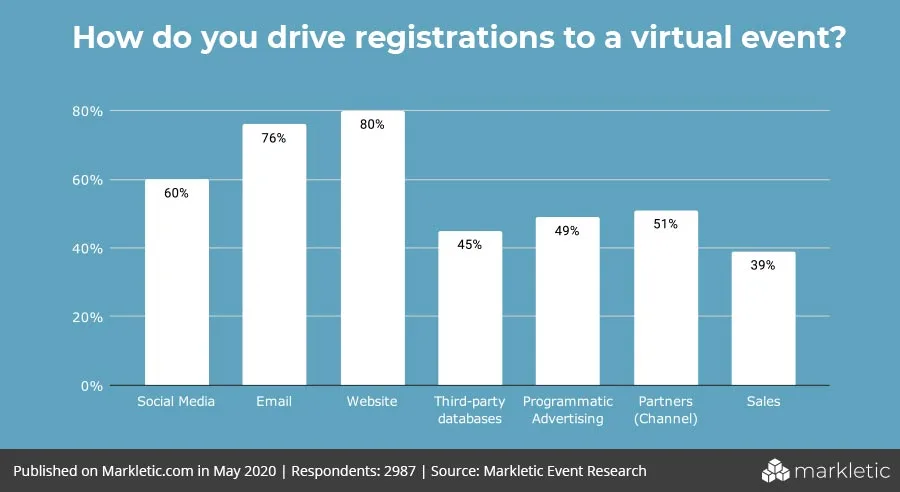
Marketing channels statistic (Credit to: Markletic)
While event registration is a crucial part of your event planning, it’s your marketing strategy that really drives success. Planning and executing your marketing campaign well before the registration opens can significantly impact your event’s outcome.
Effective pre-event promotion increases attendance rates by reaching a larger audience and giving them ample time to commit. Early registration also provides valuable insights into expected attendance, allowing for better logistical planning and preparation. Plus, early bird discounts and special offers can boost your revenue upfront, helping to cover initial expenses.
Starting your marketing early creates opportunities for ongoing promotion, keeping your event at the forefront through email newsletters, social media campaigns, and targeted ads. This continuous engagement builds anticipation and excitement, improving attendee involvement.
Additionally, knowing your numbers in advance streamlines the check-in process, reducing wait times and enhancing satisfaction on the day of the event. Early registration also allows for personaliwed experiences and facilitates pre-event networking, fostering a sense of community among attendees. So, while setting up your event registration is essential, dedicating time and effort to your marketing strategy is what truly sets your event up for success.
Be Aware of a Poorly Designed Event Registration Page
A poorly designed registration page can confuse potential attendees and deter them from completing the process. Simplify the registration process to make it easy to navigate. Highlight the benefits of attending the event to make it appealing to your target audience. Offer incentives like early bird discounts and ensure your call to action conveys urgency.
Avoid Complicated Registration Form
A complicated registration form can overwhelm attendees. Avoid making the form overly complex. Ensure the checkout timer allows enough time for completion. Only ask for essential information from attendees.
Technical Issues
Technical issues can frustrate users and lead to abandoned registrations. Make sure the registration page works properly and loads quickly.
Lack of Payment Options
Limited payment options can deter potential registrants. Offer a range of payment options, including online payment processing.
High Ticket Price
High ticket prices can limit your audience. Consider the price point to ensure it’s appealing to a wider audience.
Limited Ticket Availability
Having too few ticket types available or an event that is partially sold out can discourage registrations. Ensure a variety of ticket types are available so you can cater every budget of each attendee.
By addressing these common issues, you can make sure your event registration landing page is user-friendly, efficient, and ready to handle a smooth registration process for your attendees.
How to Set Up Online Registration for an Event

Register anywhere (Credit: Pexels)
Setting up online registration for your event doesn’t have to be overwhelming. Follow these clear and straightforward steps to ensure a smooth process:
1. Define Your Event
Before diving into the setup, take a moment to outline the key details of your event. Define the purpose, date, time, location, and target audience. This initial step provides clarity and helps tailor the registration process to meet your needs.
💡Best practice: Create a detailed event brief to share with your team to ensure everyone is on the same page.
2. Choose a Registration Platform
Selecting the right event registration platform is crucial. Look for a user-friendly platform that offers customisable solutions and integrates well with your other tools. Consider factors such as cost, features, and ease of use. Platforms like Micepad offer comprehensive solutions tailored to your specific needs.
💡Recommended: Opt for a platform that offers a free trial so you can test its features before committing.
3. Start Building a Landing Page
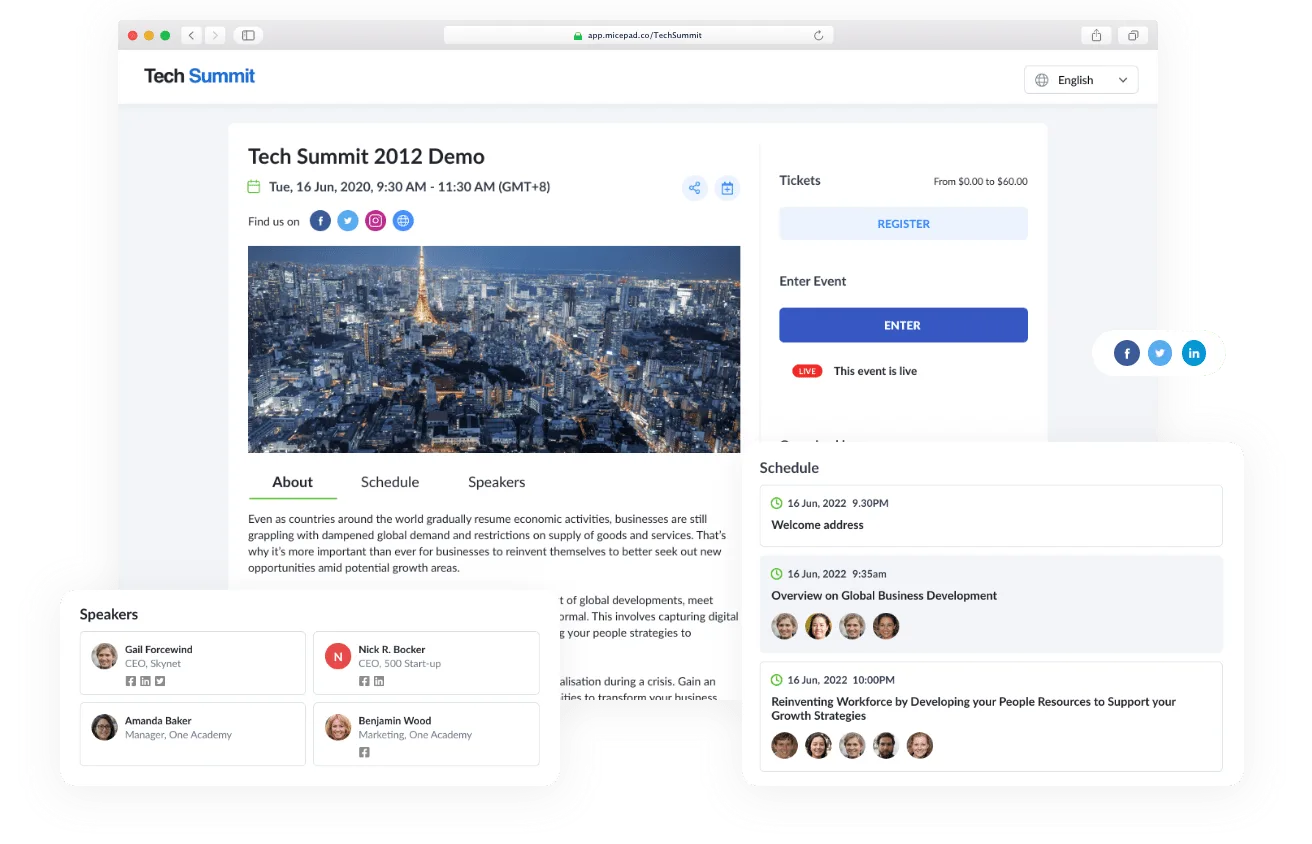
Create a landing page for your event using a simple drag-and-drop builder. Platforms like Micepad offer templates you can customise with text blocks, banners, fonts, and colors. This page is your event’s first impression, so make it engaging and informative.
💡Best practice: Include a clear call-to-action (CTA) on your landing page to guide visitors to register immediately.
4. Create Ticket Pricing
Set up various ticket tiers and price ranges. Define different levels of access based on ticket type. For example, higher-priced tickets can offer full access to all event content, while lower-tier tickets might provide limited access.
💡Recommended: Offer early bird discounts to encourage early registrations and boost initial interest.
5. Allow Add-Ons & Group Registrations
Include options for group registrations and special add-ons. This can boost your revenue and attract more attendees. For instance, you can offer paid webinars or exclusive sessions as add-ons during the registration process.
💡Best practice: Highlight the value and exclusivity of add-ons to create a sense of urgency and FOMO (Fear of Missing Out).
6. Add Payment Options

Automated payment (credit: Pexels)
Integrate multiple secure payment gateways into your registration form. Popular options include PayPal, Stripe, and Authorize.net. Ensure that you offer a range of payment methods, including credit card payments, to accommodate all potential attendees.
💡Recommended: Test all payment gateways thoroughly to ensure a smooth transaction process for users.
7. Customise and Brand Your Registration Page
Add your logos, banners, and brand colors to the registration page. This step enhances brand uniformity and makes a great first impression. Use your company’s imagery and fonts to create a cohesive look that resonates with your audience.
💡Best practice: Consistently update your registration page to reflect any changes or updates in your event details.
8. Create Your Registration Form
Design a user-friendly registration form to collect essential attendee information. Keep it simple, asking for only necessary details such as name, email, contact information, and any special requirements. The goal is to make it easy for attendees to sign up without feeling overwhelmed.
💡Recommended: Include a progress bar in the form to show users how many steps are left, reducing drop-off rates.
9. Promote Your Event
Utilise various marketing channels to drive attendance. Promote your event on social media, through email marketing, and by partnering with industry influencers. Consistent and well-timed promotions help reach your target audience effectively.
💡Best practice: Create a content calendar to plan and schedule your promotional activities ahead of time.
10. Monitor Registration
Track your registration progress using analytics tools. Monitor metrics like registration rates, ticket sales, and demographic data to make informed decisions and adjust your promotion strategy as needed. This helps ensure your event’s success.
💡Recommended: Set up regular check-ins with your team to review metrics and make necessary adjustments.
11. Send Confirmation Emails
Send personalised confirmation emails to registrants with event details and logistical information. This step ensures attendees have all the necessary information and feel confident about their participation.
💡Best practice: Include a calendar invite in your confirmation email to help attendees easily add the event to their schedules.
12. Prepare for Check-In
Set up check-in stations and train your staff in advance. Use on-site check-in solutions to streamline the process, reduce wait times, and enhance attendee satisfaction.
💡Recommended: Conduct a rehearsal check-in with your team to identify and fix any potential issues.
13. Follow Up
Send reminders to registered attendees as the event date approaches to keep them engaged. After the event, send thank-you emails, gather feedback, and maintain relationships with attendees. This fosters loyalty and encourages repeat attendance.
💡Best practice: Use surveys to gather detailed feedback from attendees to improve future events.
By following these steps and incorporating best practices, you can create a seamless online registration process that enhances the overall experience for your attendees.
Partner with Micepad to Revolutionise Your Online Event Registration
When it comes to online event registration, Micepad can help you do more than just handling your sign-ups process! We offer you an all-in-one solution for managing the entire ticketing process as well. Imagine the convenience of managing both registration and ticketing seamlessly on the same platform. It’s not just easier, it’s smarter!
One of the standout features of Micepad is its ability to help you design and amplify your brand. You can create a stunning landing page for your virtual or hybrid event that truly reflects your brand’s personality. With Micepad, you can easily incorporate essential event details, from program guides and agendas to speaker profiles. Remember about marketing strategy? This element can make your event look even more professional and engaging right from the start.
Ready to see Micepad in action? Request a demo today and discover how we can help you revolutionise your event registration and ticketing experience!

See registration features in action
Conditional logic forms, multi-tier ticketing, auto QR confirmation emails.