Works with Any Registration Platform
Import Attendees from Any Platform
Switching registration platforms is painful. So don't. Export your attendee list from Cvent, Luma, Eventbrite, or any tool, import the CSV into Micepad, and you're ready for check-in and badge printing in minutes.
Start for Free
How It Works
Export your attendee list, import the CSV, start checking in.
1. Export Your Attendee List
Export your attendee list as a CSV or Excel file from whatever registration platform you're using — Cvent, Luma, Eventbrite, Google Forms, or any other tool.
2. Import into Micepad
Upload the CSV to Micepad and map your columns to attendee fields (name, email, company, ticket type). Micepad automatically generates a unique QR code for each attendee.
3. Check In & Print Badges
Set up your kiosks and start checking in. Attendees scan their QR code, their badge prints automatically, and you get real-time attendance data.
Smart Field Mapping
Micepad's CSV importer lets you map any column to any field. First name + last name, or full name. Company, title, ticket type, dietary needs — map whatever you need.
Automatic QR Codes
Every imported attendee gets a unique QR code automatically. Send QR codes via email or let attendees check in by name search at the kiosk.
Or Use Built-in Registration
Don't need a separate registration tool? Micepad includes customizable registration forms, ticketing, and email confirmations — all connected to check-in and badge printing.
Import from Cvent
Organizations like Standard Chartered and HSBC use Cvent for registration and Micepad for on-site check-in and badge printing. Export your attendee list as CSV, import into Micepad, and you're ready.
- Export attendees from Cvent as CSV
- Map Cvent fields to Micepad automatically
- QR codes generated for every attendee
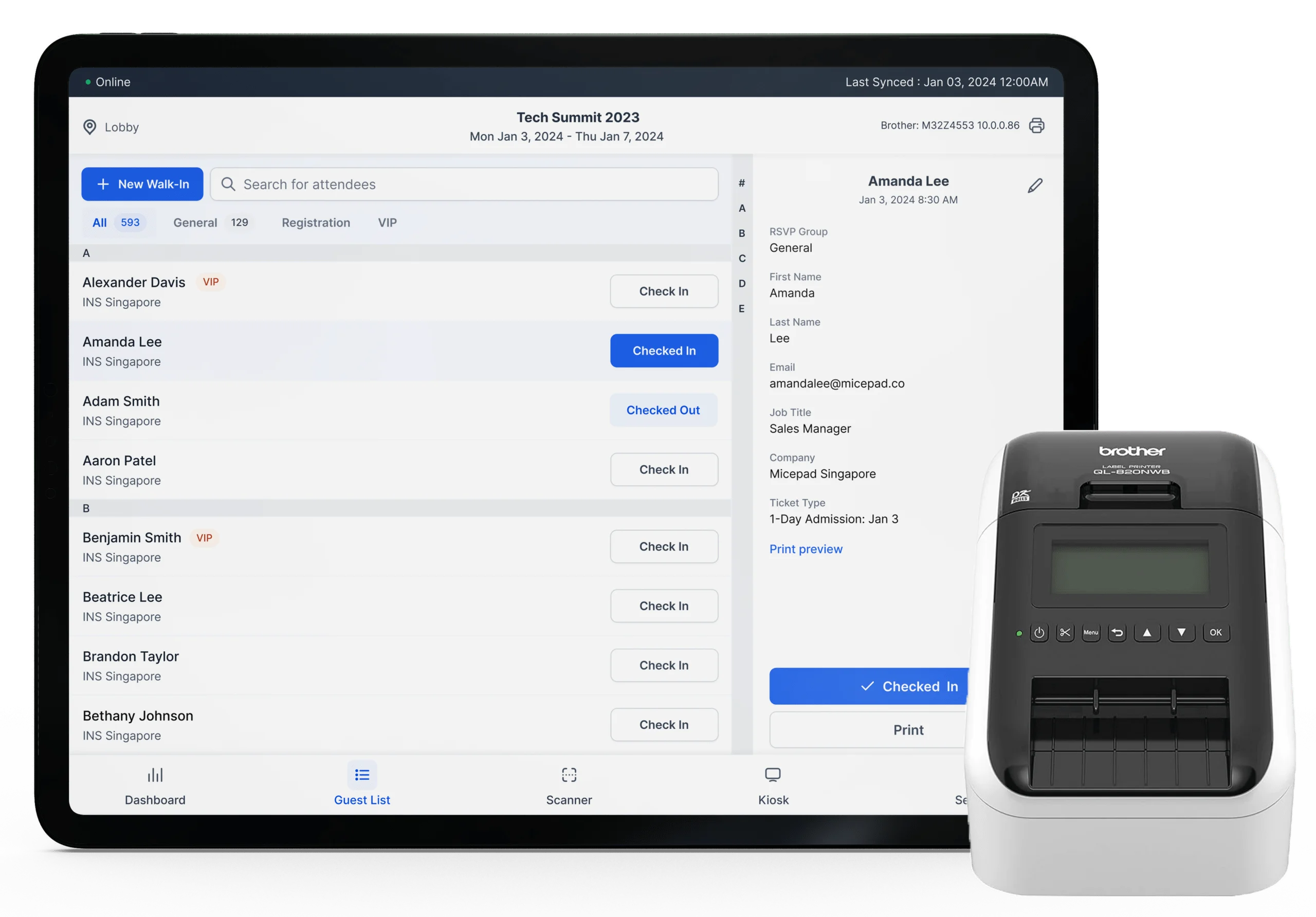
Import from Eventbrite
Using Eventbrite for ticketing? Export your attendee list and import into Micepad for professional on-site check-in with badge printing.
- Export Eventbrite orders as CSV
- Ticket types map to badge categories
- Handle will-call and walk-ins on-site

Import from Luma
Luma handles your invites and RSVPs. Micepad handles on-site check-in and badge printing. Export, import, done.
- Export Luma guest list as CSV
- Import and generate QR codes in minutes
- Professional badge printing on arrival
Import from Google Sheets or Excel
Managing attendees in a spreadsheet? Save as CSV and import directly into Micepad. Works with any format — just map your columns.
- Any CSV or Excel file works
- Flexible column mapping
- No specific format required
常見問題
Micepad accepts CSV and Excel (.xlsx) files. Any spreadsheet application (Google Sheets, Excel, Numbers) can export to these formats.
In Cvent, go to your event's Attendee List, select all attendees, and click Export to CSV. Then upload the CSV to Micepad and map the columns (name, email, company, etc.).
Currently, Micepad uses CSV import to work with Cvent and other platforms. This gives you full control over what data you import without requiring IT setup or API credentials. API integrations are on our roadmap.
Importing a CSV takes seconds. A list of 1,000 attendees imports in under 10 seconds. Micepad automatically generates QR codes for each attendee during import.
Yes. You can re-import an updated CSV at any time. Micepad matches attendees by email address, updating existing records and adding new ones. You can also edit individual attendees directly in Micepad.
No. If you're using another platform for registration, you only need Micepad for on-site check-in and badge printing. Import your attendee list and you're ready to go. Micepad's registration forms are optional.
您的團隊負責活動,Micepad 負責營運。
每場活動都產生同樣的營運工作。匯入參加者名單、清理重複資料、修正格式、發送確認信、處理退信、列印名牌、統計出席人數、撰寫活動後報告。一年 20 場活動算下來,您的團隊不是在辦活動——而是在處理資料。
Micepad Agents 自動處理這些工作。匯入雜亂的 CSV 並清理——去除重複紀錄、統一姓名格式、標記無效的電子郵件。從模板生成名牌,發送含退信處理的確認郵件。即時監控報到狀況,當場次達到容量上限時發出警報。活動結束後,自動彙整出席報告、缺席率和參與度分數,不需要任何人手動整理試算表。
創意和人際關係的工作留給您的團隊,這才是他們發揮價值的地方。講者協調、贊助商關係、確保場地氛圍到位——這些需要人來處理。資料處理的工作,就交給 Agents。
See How Micepad Compares
Evaluating other platforms? See detailed comparisons.
Bring your attendee list and try it yourself
Export from any platform, import into Micepad, and see how fast check-in can be. Your first event is on us.
Import Your Attendees