Organising a corporate conference at Suntec City, a B2B trade exhibition at Marina Bay Sands, or a high-level summit at Raffles City Convention Centre presents a distinct set of operational challenges. Singapore delegates expect a frictionless experience from the moment they land on your signup page to the second they enter the event hall.
Yet many event teams still work across fragmented tools: forms on one platform, local SGD payments handled manually, confirmation emails sent from another system, and queues building at the registration desk.
The right event registration system consolidates registration forms, payment processing, automated communications, onsite check-in, badge printing, and reporting into one connected workflow. This guide explains how these platforms work, the criteria Singapore event planners should evaluate, and how leading local and global options compare in 2026.
What Is an Event Registration System?
An event registration system is an end-to-end digital tool for managing how attendees sign up, pay for, and check into an event. Terms such as event registration software, event registration platform, and attendee registration system are often used interchangeably. The objective is the same: capture delegate data reliably while delivering a seamless attendee experience.
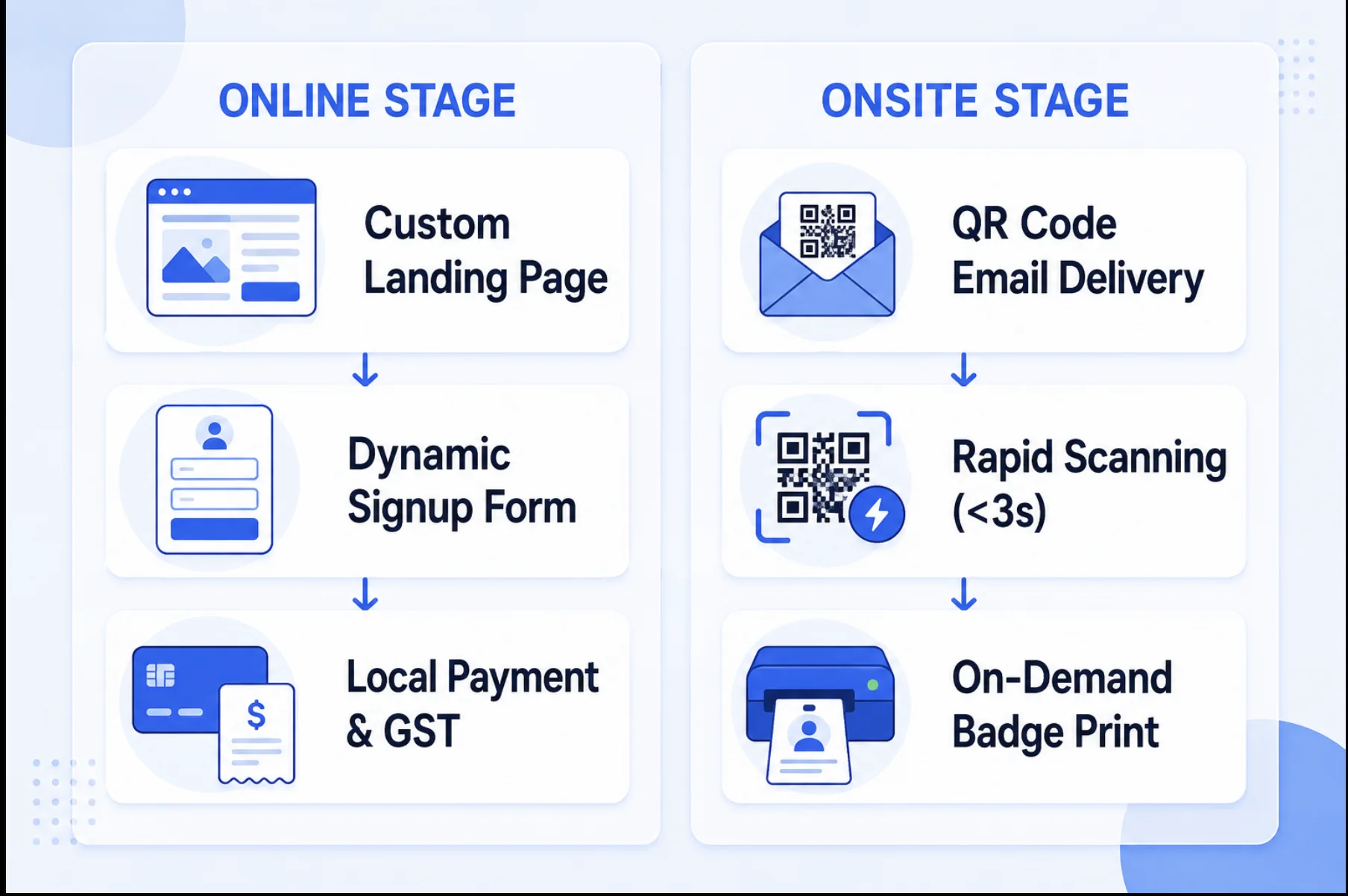
A complete system should connect the online journey with onsite execution. Registration information collected weeks before the event should power confirmation emails, QR credentials, badge templates, check-in stations, attendance dashboards, and post-event reporting without repeated data entry.
Core Functions of a Complete System
A modern online event registration solution replaces fragmented spreadsheets and manual workflows with six connected operational modules.
1. Customisable Registration Forms and Conditional Logic
An enterprise-grade attendee registration system should tailor the signup journey to each delegate category. Dynamic form builders can show unique questions, tracks, or restricted passes to VIPs, sponsors, media, speakers, exhibitors, and general attendees.
This helps organisers collect corporate designations, dietary requirements, accessibility needs, session selections, and explicit PDPA consent choices without forcing every attendee through irrelevant fields.
2. Ticketing and Multi-Currency Payment Processing
Integrated event ticketing software manages Early Bird rates, group packages, sponsor allocations, promotional codes, and multiple ticket types. For Singapore events, evaluate support for SGD, secure card gateways, invoice-first corporate workflows, local payment methods where required, and itemised GST documentation.
3. Automated Confirmations and Attendee Communications
Once registration is complete, the platform should trigger a branded confirmation email containing the event details, calendar invite, receipt or invoice, and a unique delegate QR code. Segmentation tools can then send reminders, venue instructions, agenda updates, and targeted messages before event day.
4. QR Code Check-In
A modern conference registration system equips entry desks and kiosks with high-speed scanning. Staff can authenticate a delegate's QR code, update their attendance status in the central database, and move the guest through the door in seconds. Local device caching keeps the workflow operating when venue Wi-Fi becomes unstable.
Explore the practical onsite workflow in our event check-in software guide for Singapore.
5. On-Demand Badge Printing and Self-Service Kiosks
Instead of pre-printing and sorting every badge, the registration system can connect to a wireless thermal printer. When a guest scans at a self-service kiosk or staffed counter, a personalised badge prints on demand. This reduces waste from no-shows and makes walk-ins or last-minute name changes easier to handle.
6. Real-Time Analytics and Attendance Reporting
A complete system gives organisers a live view of registration velocity, revenue, ticket conversion, onsite arrivals, and session attendance. Teams can monitor peak check-in periods from any device and export accurate reports for internal stakeholders, sponsors, CRM systems, and follow-up campaigns.
What to Look for in an Event Registration Platform in Singapore
Global platforms may cover generic ticketing requirements, but Singapore events demand several local and operational capabilities.
1. PDPA Data Compliance and Governance
Collecting personal data such as mobile numbers, corporate email addresses, dietary information, or identity details creates obligations under Singapore's Personal Data Protection Act. Your platform should support:
- Explicit and configurable consent fields
- Secure data transmission and storage
- Role-based access for event staff and vendors
- Configurable data-retention and deletion workflows
- Clear export and audit processes
Software features can support compliant operations, but organisers remain responsible for defining their purpose, consent language, access policies, and retention rules.
2. Local Payments and GST Invoicing
For paid seminars, conferences, and exhibitions, check whether the registration and payment workflow supports:
- SGD pricing and secure credit card processing
- PayNow, bank transfer, or other local payment methods where needed
- Automatic 9% GST calculations and itemised invoices
- Purchase-order and invoice-first workflows for corporate delegates
- Refund, cancellation, and payment reconciliation reports
3. Rapid QR Check-In and Onsite Hardware
Long queues at Suntec Singapore Convention & Exhibition Centre or Singapore EXPO frustrate delegates and delay opening sessions. Look for QR scanning that completes in seconds, native integration with thermal badge printers, support for walk-ins, and self-service kiosk mode on standard tablets.
4. Offline Mode and Local Sync
Venue Wi-Fi can become congested when thousands of attendees arrive simultaneously. A reliable attendee registration system should cache the attendee list locally, continue scanning and printing without a live connection, and synchronise changes automatically when connectivity returns.
5. Transparent and Flexible Pricing
Compare the total cost rather than the headline platform fee. Consider whether a free tier, flat per-event plan, per-ticket model, or annual enterprise licence best matches the number and size of events you run.
6. Singapore-Timezone and Onsite Support
When an issue occurs during the 8:00 AM arrival rush, support in a distant timezone may not be sufficient. Ask whether the vendor offers Singapore business-hours coverage, rapid remote escalation, equipment staging, and optional onsite technical support.
7. CRM and Marketing Automation Integrations
Registration data should not remain trapped in a spreadsheet. For corporate events, assess integrations with Salesforce, HubSpot, Marketo, Microsoft Dynamics, or your own data warehouse. Useful workflows include:
- Real-time lead sync: Send new registrations and mapped custom fields to the CRM.
- Automated lead scoring: Update contact records when an attendee registers, checks in, or attends a session.
- Post-event nurture: Trigger follow-up emails, surveys, and content delivery from verified attendance data.
How to Choose the Right Platform for Your Event
The best event registration software depends on the scale, audience, revenue model, and operational complexity of your event.
| Event type | Key operational requirements | Recommended system approach |
|---|---|---|
| B2B conferences and summits | Multi-track agendas, session check-in, dynamic badges, corporate invoices | Dedicated platform with onsite hardware support |
| Corporate workshops and seminars | Fast form setup, consent fields, calendar integration, low overhead | Lightweight software with flat per-event pricing or a free tier |
| Trade shows and exhibitions | High-volume scanning, kiosks, exhibitor lead capture | High-throughput system with offline sync and multi-kiosk support |
| Community and public events | Consumer reach, simple ticketing, social discovery, mobile signup | Public marketplace with integrated ticketing and promotion |
Before committing, run a complete test registration, payment, confirmation, check-in, badge print, and data-export cycle. The demo should use your real ticket types and custom fields, not only the vendor's sample event.
Best Event Registration Platforms in Singapore (2026)
The following comparison covers local and global platforms commonly evaluated by Singapore event teams. Pricing and feature packages change, so confirm current terms directly with each vendor before purchasing.
Comparison Overview
| Platform | Best for | Pricing model | QR check-in | On-demand badge printing | Singapore payment support | Free tier |
|---|---|---|---|---|---|---|
| Micepad | Regional B2B conferences and corporate events | Free; paid plans from SGD 300/event | Yes | Yes | Cards, invoices, offline payments | Up to 50 attendees |
| GEVME | Enterprise and public-sector events | Subscription or custom quote | Yes | Available | Local options available | Limited plan; verify terms |
| EventNook | Local seminars and ticketed events | Subscription plans; gateway fees may apply | Yes | Available | Local options available | Limited plan; verify terms |
| Klobbi | Bespoke government and corporate events | Custom project quote | Yes | Available | Custom setup | No public free tier |
| Cvent | Global enterprise event programmes | Custom annual quote | Yes | Available through its onsite offering | Depends on configuration | No public free tier |
| Eventbrite | Public consumer and community events | Per-ticket fees; free events can be free to publish | Yes | No native on-demand workflow | Standard gateway options | Free events |
| Whova | Academic conferences and mobile-app-led events | Custom event quote | Yes | Available on supported plans | Gateway-dependent | No public free tier |
1. Micepad
Micepad is an APAC-focused event management platform built for corporate planners and conference organisers across Singapore and Southeast Asia. It connects online registration with onsite QR check-in, kiosk operation, and badge printing.
Key strengths:
- A permanent free tier for events with up to 50 attendees, with paid plans starting from SGD 300 per event
- Fast QR scanning, automated thermal badge printing, self-service kiosk mode, and offline operation
- Singapore-based support and workflows designed for regional corporate events
- Registration forms, attendee communications, and integrations on qualifying plans
Best fit: B2B conferences, corporate meetings, seminars, and exhibitions that need reliable onsite execution. Micepad is not a public entertainment-event marketplace.
Learn more about Micepad's Singapore registration software or review transparent Singapore pricing.
2. GEVME
GEVME is a Singapore-headquartered enterprise platform with tools for registration, event pages, onsite operations, virtual experiences, and audience engagement.
Key strengths:
- Configurable workflows for complex, multi-day, and public-sector events
- A broad suite spanning registration, content, matching, and event delivery
- Local market experience and Singapore support
Consideration: Teams running occasional or smaller events should compare the setup effort and commercial model with lighter self-service alternatives.
3. EventNook
EventNook is a Singapore event registration and ticketing platform serving corporate and commercial events.
Key strengths:
- Local payment and invoicing workflows
- QR check-in tools and supported badge-printing setups
- Self-service registration and ticket management for seminars and conferences
Consideration: Compare its engagement, app, integration, and reporting modules with your broader event requirements.
4. Klobbi
Klobbi provides customised event technology and managed services for government, education, and corporate events in Singapore.
Key strengths:
- Bespoke development and managed onsite execution
- Registration, submissions, check-in, and hardware support
- Experience with specialised attendee and security workflows
Consideration: The custom project model is better suited to tailored deployments than instant self-service setup.
5. Cvent
Cvent is a global enterprise event platform covering venue sourcing, registration, marketing, onsite operations, reporting, and integrations.
Key strengths:
- Broad enterprise feature depth and multi-event programme management
- Complex registration logic, analytics, and CRM integrations
- Established support for large multinational event portfolios
Consideration: Pricing is quote-based and implementations can involve more configuration than a focused per-event tool. Request a current proposal based on the modules and attendee volume you actually need.
6. Eventbrite
Eventbrite is a widely recognised ticketing marketplace for public events, workshops, entertainment, and community gatherings.
Key strengths:
- Consumer discovery through a public event marketplace
- Fast self-service setup for straightforward ticketed events
- Integrated ticket sales and basic QR ticket validation
Consideration: Corporate planners should separately assess tax invoicing, advanced conditional registration, kiosk badge printing, and local onsite support.
7. Whova
Whova combines registration with a mobile event app, agenda tools, community features, attendee networking, and exhibitor engagement.
Key strengths:
- Strong mobile attendee experience and networking features
- Agenda, announcements, community boards, and event engagement in one app
- Registration and onsite tools on supported packages
Consideration: Singapore teams should confirm local support coverage, payment configuration, hardware availability, and the exact onsite package before committing.
Onsite Execution and Hardware Architecture for Singapore Venues
Selecting an event registration platform is only half the job. Physical execution at Suntec Singapore, Marina Bay Sands, Raffles City, or Singapore EXPO determines the attendee's first impression. A resilient deployment connects the kiosk, print engine, and local attendee database without making every action dependent on public venue Wi-Fi.
Hardware Deployment and Kiosk Configuration
To handle heavy morning arrivals, typically between 8:00 AM and 9:30 AM SGT, high-volume events often combine self-service kiosks with staffed exception desks.
- Self-service kiosk stations: Standard iPads on secure stands let delegates scan a mobile QR code or search by name.
- Wireless thermal badge printers: Brother or Zebra printers produce badges without ink or toner, reducing consumables and smudging.
- Badge paper options: Choose direct-thermal labels, recyclable cards, or tear-proof butterfly stock based on the event format and sustainability goals.
- Exception desk: Keep one staffed station for walk-ins, misspelled names, accessibility support, and credential changes.
Network Resilience and Venue Wi-Fi
Even premium convention centres experience congestion when thousands of devices join the network at once. An offline-first platform caches the attendee database across check-in tablets. Scans, badge prints, and walk-in registrations continue on the local network, then synchronise with the cloud when connectivity stabilises.
A dry run should include intentionally disconnecting the internet. Confirm that every station can still search, scan, prevent duplicate check-ins, print, and reconcile data after reconnecting.
Pricing and Fees: What Event Registration Software Really Costs
Headline software rates rarely represent the full cost of event registration. Compare the platform, payment, hardware, consumables, and support costs together.
Common Pricing Models
- Per-ticket percentage plus flat fee: Common for public ticketing platforms. It is easy to start, but fees grow with ticket volume and value.
- Flat pay-per-event tiers: Common for B2B systems such as Micepad. A fixed price based on attendee capacity gives corporate teams predictable event budgets.
- Annual subscription licensing: Best suited to organisations running a portfolio of events and needing common integrations, governance, and reporting.
- Custom managed-service pricing: Used when the vendor supplies bespoke workflows, onsite staff, hardware, and delivery responsibility.
Hidden and Secondary Costs
- 1Base platform feePer-event tier, ticket fee, annual licence, or custom project quote
- 2Payment processingCard gateway, PayNow or bank-transfer operations, refunds, and reconciliation
- 3Hardware and consumablesPrinters, tablets, stands, scanners, badge stock, and lanyards
- 4Onsite technical supportStaging, network setup, staff training, and event-day troubleshooting
Ask vendors to identify these items separately:
- Payment-gateway transaction and refund fees
- Thermal printer, scanner, iPad, stand, and router rental
- Badge stock, lanyards, and shipping
- Setup, custom integration, or data-migration fees
- Onsite technical manpower and overtime
- Additional attendee, email, device, or administrator charges
Step-by-Step Implementation Timeline
Deploying a conference registration system requires structured testing. The following eight-week plan leaves enough time for payment, communication, hardware, and offline checks.
| Timeline phase | Operational focus and key deliverables |
|---|---|
| Weeks 8–6: Platform setup and compliance | Select the platform; configure branded pages; build conditional forms; review every data field against PDPA requirements; set ticket tiers and GST rules. |
| Weeks 5–3: Payment and communication testing | Connect gateways; run end-to-end test transactions and refunds; design badges; test confirmation emails, QR codes, invoices, and calendar files. |
| Weeks 2–1: Hardware staging and dry runs | Reserve tablets, stands, printers, and badge stock; cache the attendee database; test offline mode; brief the front-of-house team on walk-ins and exceptions. |
| Event day: Door execution and reporting | Deploy stations at least 90 minutes before doors open; verify local network links; monitor arrival rates; export attendance for CRM and sponsor reporting. |
For a 1,000-person event, rehearse with the expected number of simultaneous stations rather than testing one tablet and assuming the other devices will behave identically.
Frequently Asked Questions
What is an event registration system?
An event registration system automates participant signup, payment collection, confirmations, attendee credentials, onsite QR check-in, badge printing, and attendance reporting.
How much does event registration software cost in Singapore?
Costs vary by model. Free tiers are available for small events, Micepad paid plans start from SGD 300 per event, public ticketing platforms charge transaction or per-ticket fees, and enterprise platforms usually provide custom annual quotes. Hardware, payment processing, consumables, and onsite support may be additional.
Is there free event registration software?
Yes. Micepad's Free plan supports events with up to 50 attendees and includes QR code check-in. Some public ticketing tools are also free for events that do not charge admission. Always review attendee limits and which reporting, payment, printing, or integration features require a paid plan.
Can I collect payment and register attendees in one system?
Yes. Modern registration platforms connect forms with card gateways, invoices, and offline payment options so delegates can register and pay in one workflow. Confirm which Singapore payment methods, currencies, taxes, and reconciliation reports are supported by your selected plan.
Does an event registration platform support QR code check-in?
Most professional platforms issue each attendee a unique QR code in their confirmation email. Staff or kiosks scan it onsite to validate admission and update the attendance record. Compare scan speed, offline support, multi-station sync, walk-in handling, and badge-print triggers.
Is event registration software PDPA compliant in Singapore?
A platform can provide features that support PDPA-aligned operations, including consent fields, role-based access, encryption, and configurable retention. Compliance also depends on how the organiser configures the system, informs attendees, grants access, and manages collected data.
Finding the Right System for Your Next Singapore Event
The right conference registration system depends on your operating priorities. Public social events may benefit from Eventbrite's marketplace reach. Global organisations managing complex event portfolios may prefer an enterprise suite such as Cvent. Events requiring bespoke local delivery may evaluate managed-service providers.
For Singapore corporate planners running B2B conferences, seminars, and trade exhibitions, Micepad combines online registration, local support, fast QR check-in, on-demand badge printing, transparent per-event pricing, and a free tier for small events.
Ready to streamline your event registration? Start your first event free with Micepad for up to 50 attendees, with no credit card required.